panes sizes change every time I open free commander
panes sizes change every time I open free commander
Every time I open Free commander I find the panes have changed completely so I have to resize them all. I would attach a screenshot but I can't see where to do it here.

Re: panes sizes change every time I open free commander
Which version are you using? Make sure, to upgrade to the latest version first.
FAQ – Settings – My settings or/and keyboard shortcuts are not preserved after program restart, how to solve it? - FreeCommander
How to report a bug (Read before posting!) - FreeCommander Forum
FAQ – Settings – My settings or/and keyboard shortcuts are not preserved after program restart, how to solve it? - FreeCommander
How to report a bug (Read before posting!) - FreeCommander Forum
Sometimes it's useful to make a screenshot of the problem. You can use the integrated FreeCommander feature (menu > Tools > Desktop Snapshot), or one of many free tools available on the Internet, or just the integrated Windows feature - press PrintScreen to make a screenshot, then open any image editor, e.g. Paint, press Ctrl+V to paste, save it and upload it to https://postimages.org/ , or https://imgur.com/ for example. Do not place large screenshots in the forum, use the links, or thumbnails instead. Please use the English language for screenshots, you can use /Lng=English command line parameter.
Re: panes sizes change every time I open free commander
I have the latest version. It is unpredictable I thought at first it was only when I have the favourites pane open as it was ok for a few days but this morning the same thing happened with the favourites closed. I suspect it happens more often with the favourites open
It only happens after the PC is turned off and on
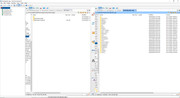
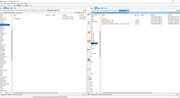
It only happens after the PC is turned off and on
Who is online
Users browsing this forum: No registered users and 71 guests