Page 1 of 1
Columns auto-resize not correct
Posted: 03.02.2015, 03:04
by casper520
I am using FC XE 2015 build 685 on Win XP.
I setting - fc_default_view - Define columns - Autosize for "Name" column.
But it still not correct in list view:

Re: Columns auto-resize not correct
Posted: 06.02.2015, 18:59
by Marek
Please check Settings->File/folder list: Max. column width for list view. For auto size the value should be 0.
Re: Columns auto-resize not correct
Posted: 07.02.2015, 04:54
by DeepAnger
Hello,
I too have a non working column size (Build 686 X64):
viewtopic.php?f=19&t=6345
It works only on local drives and
never on network shares.
When this other bug occurs (every-time) on a mapped network drive, it makes FC a real annoyance to use : I can't use it anymore.
viewtopic.php?f=19&t=6360
It would be great if you, Marek, or anybody else could at least comment on these bugs. I'm not the only one to have a network.
Re: Columns auto-resize not correct
Posted: 07.02.2015, 10:25
by joby_toss
In my case (FC XE 686 x64 on win7x64sp1 and a very small home network) I always use Details view.
If I check the option Use
FreeCommander for network loading everything is fine (my custom columns profile works fine).
If I check the option
Use Windows Shell for network loading, (the default setting) my custom columns profile is never used when I access a network shared folder (the default one is used instead, although I deleted the default profile
fc_default_view altogether).

P.S. I can replicate this behavior using public build 685 started with default settings.
Re: Columns auto-resize not correct
Posted: 07.02.2015, 18:11
by DeepAnger
joby_toss wrote:If I check the option Use FreeCommander for network loading everything is fine (my custom columns profile works fine).
If I check the option Use Windows Shell for network loading, (the default setting) my custom columns profile is never used when I access a network shared folder (the default one is used instead, although I deleted the default profile fc_default_view altogether).
Thank you for your comment. It helps for column size(I was able to reproduce what you described).
But it does not fix the other problem I mentioned before (network mapped drive tree is broken).
I don't regret to have spent some hours using FC64. But I now use XY because network with it is flawless.
Re: Columns auto-resize not correct
Posted: 07.02.2015, 21:40
by Marek
If the default columns profile does not work you can create specific profile (as workaround):
- Shift+F1 or right click on the 'Name' column caption
- select 'Column profiles'
- select 'Add current column profile specific to folder'
- define the title as requested
Now under Settings->Column profiles you can define the profile as you like
But it does not fix the other problem I mentioned before (network mapped drive tree is broken).
I apologize that it does not work for you. Unfortunatelly so long I can not reproduce your problem it is difficult for me something to change.
Re: Columns auto-resize not correct
Posted: 09.02.2015, 19:46
by DeepAnger
Marek wrote:
I apologize that it does not work for you. Unfortunatelly so long I can not reproduce your problem it is difficult for me something to change.
Hello Marek,
Thank you for being here.
Today, I compared 2 versions of FC 64 on 2 computers on different networks.
My own PC has always the problem, the other doesn't.
I copied the working version from my office computer and started it on my home network computer.
The first difference I saw is that my mapped network drive doesn't appear on the non working version. I created a favorite to access it.
I tried to exchange parameters by copying the SETTINGS subfolder.
In the best case scenario, the Build 685 64 works, as long as I "Use FreeCommander for Network Loading" and some other parameters from my other computer. With Build 680 the mapped drive appears as the first drive : J C D E F etc...
This order problem seems fixed in Build 685 which displays drives as C D E F J etc...
In all other cases, the mapped network drive does not appear in the drive list and all attempts to access to it produce a crazy tree display.
If you're willing to analyze why it only works with some very precise unknown set of options and many other fail, I could send you my settings subfolder.
Regards.
Re: Columns auto-resize not correct
Posted: 09.02.2015, 22:06
by Marek
Have you only one mapped drive? Is something special with your J drive? Could you show/send the definition from the mapping?
Please send me the working and not working settings from the 685 release.
Re: Columns auto-resize not correct
Posted: 14.02.2015, 03:27
by DeepAnger
Marek wrote:Have you only one mapped drive? Is something special with your J drive? Could you show/send the definition from the mapping?
Please send me the working and not working settings from the 685 release.
It's a normal simple network share from a Windows 7 to another one.
CMD wrote:D:\>net use
New connections will be remembered.
Status Local Remote Network
-------------------------------------------------------------------------------
OK J: \\SERVER9\H Microsoft Windows Network
The command completed successfully.
Depending on some settings, that drive is displayed, on the tree and the drive bar or not.
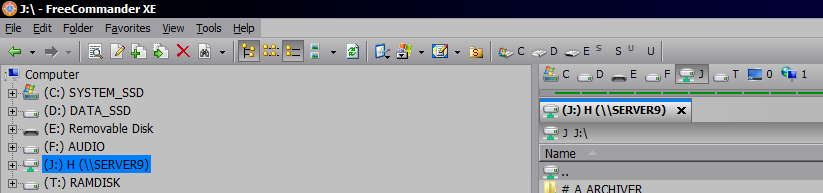
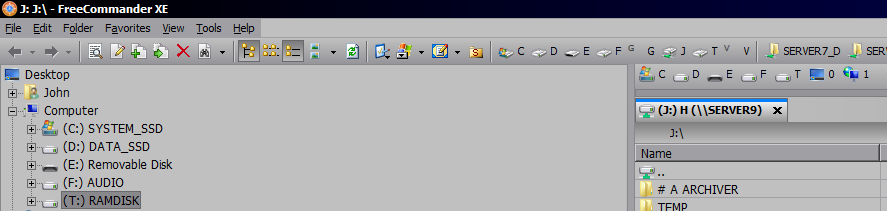
Re: Columns auto-resize not correct
Posted: 07.03.2015, 19:08
by joby_toss
In build 687 network shares retain the custom column profile. Thank's!
But I'm losing my custom column profile when I hit my "Opens Desktop folder in the focused panel" toolbar button (I don't know if it started with this version).
Re: Columns auto-resize not correct
Posted: 07.03.2015, 20:10
by alf5000
confirmed.
as I found out it's a very old problem (at least down to FCXE651)
in case you've got time to fiddle around with that problem please, Marek, also have a look at another misbehavior related to Desktop-view - I have a hard time explaining it, so just watch the picture and you'll see what happens when I press the 'Desktop' icon.
