Page 1 of 1
find and kill empty folders
Posted: 31.12.2014, 15:28
by SeaStar
Hello
I there an easy way to find and kill all empty folders?
Re: find and kill empty folders
Posted: 31.12.2014, 16:57
by Dreamer
Hello SeaStar and welcome to the FreeCommander forum.
I'm not sure if there are other ways to achieve this, but this workaround works:
- enable option in menu > view > plain view - folders*
- enable option in menu > folder > size of folders*
- click the title "size auto" or "size" to sort by size (or use menu for other views than Details)
- empty folders will be displayed on top with the size "0 Byte(s)"
- then it's easy to select all and delete (select last 0 Byte folder and press Shift+Home, then Delete)
* it may be slow if you have many files/folders
I recommend to check if the selected folders are really empty before deleting, just press Alt+Enter or right click and select "properties" (while all zero Byte folders are selected).
Re: find and kill empty folders
Posted: 02.01.2015, 17:10
by ralfso
If you need a little "one-trick-wonder-software" for this you can use:
pcwEmptyFolder:
http://www.pcwelt.de/downloads/pcwEmpty ... 11678.html
or
Remove Empty Directories:
http://www.jonasjohn.de/red.htm
Re: find and kill empty folders
Posted: 12.04.2021, 16:35
by stephen147
RED is starting to get developed again. Such as a great program.
Here's the GitHub
https://github.com/hxseven/Remove-Empty-Directories
Releases
https://github.com/hxseven/Remove-Empty ... s/releases
You could add this to a toolbar in FC and use the %ActivDir%.
Here's my toolbar settings:
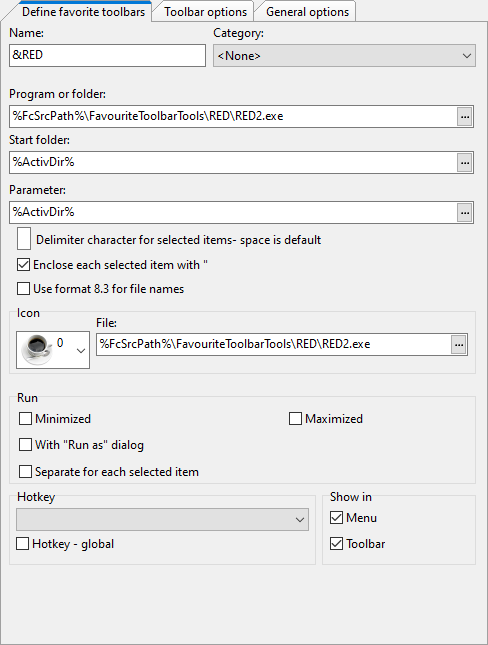
- cSt9yUeXvt.png (19.85 KiB) Viewed 11221 times
Open the app and viola, it's REaDy to go.
I'll get my coat.