Page 1 of 1
How could I create a favorite or a tab to a smartphone?
Posted: 09.01.2023, 11:52
by Donut
How could I create a favorite or a tab to a smartphone, its internal storage or its mini SD card?
Re: How could I create a favorite or a tab to a smartphone?
Posted: 09.01.2023, 21:31
by Dreamer
Enter the path for the smartphone and lock the tab, press Alt+G to edit path, copy the path and use this path for favorites.
Re: How could I create a favorite or a tab to a smartphone?
Posted: 09.01.2023, 23:14
by Donut
Well, yes, I had tried that. But the path obviously changes each time the phone is connected, so that does appear to work.
Re: How could I create a favorite or a tab to a smartphone?
Posted: 28.01.2023, 21:09
by Dan-cer
I found the solution in German Free Commander forum.
First your phone has to be connected via usb to your pc. And on your phone you have to click on "OK" for enabling data transfer. The connection is established and visible now in FC.
Where?
Just click on "This computer" in left tree-view.
You'll see your phone in the list. Click on that folder and then on "Add favorite" button.
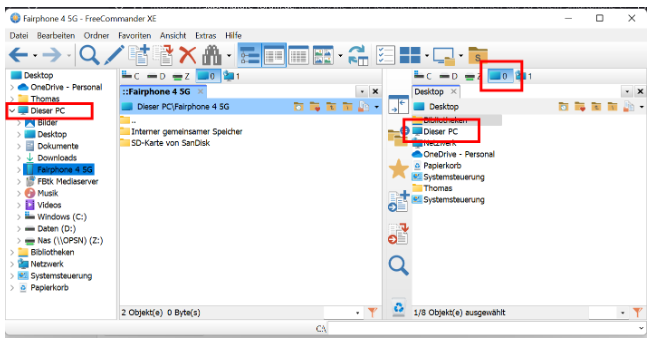
Re: How could I create a favorite or a tab to a smartphone?
Posted: 01.02.2023, 11:17
by Donut
Thank you very much! Also for finding the solution!
I have added the SD Card and the internal storage under menu "Favorites", but when I click that bookmark this is shown (so the Desktoop in both of the panels):

Re: How could I create a favorite or a tab to a smartphone?
Posted: 05.02.2023, 21:35
by Dan-cer
I use the left sidebar for favorites (instead of tree view). Both from there and from the main menu "Favorites" click on "Nokia 3.1" opens the SD-card of the smartphone, but ONLY if the device is CONNECTED and active for data transfer. Otherwise I only see the parent directory similar to your screenshot.
Re: How could I create a favorite or a tab to a smartphone?
Posted: 05.02.2023, 21:52
by Donut
but ONLY if the device is CONNECTED and active for data transfer. Otherwise I only see the parent directory similar to your screenshot.
Yes, the same here.
I use the left sidebar for favorites (instead of tree view). Both from there and from the main menu "Favorites" click on "Nokia 3.1" opens the SD-card of the smartphone,
Can't get it working here either. The same like with the other tries.
When I copy the path to the SD Card or internal storage something like this is shown:
::{20G04FL0-3AEA-1069-B3D8-08992B30339D}\\\?\usb#vid_2717&pid_ff40#hqyx9dorjzwsob7h#{6ac29578-a7fa-4435-ba67-f92f491d4f33}\SID-{10001,,24315832450176}
I believe, that "path" changes each time I connect the phone again.