Search found 22 matches
- 10.03.2026, 17:36
- Forum: Resolved Bugs, Issues, Requests
- Topic: [SOLVED] Toolbar Show Off Does Not Save Correctly
- Replies: 3
- Views: 6508
Re: Toolbar Show Off Does Not Save Correctly
@ralfso, thank you so much... I had no idea...
- 09.03.2026, 22:36
- Forum: Resolved Bugs, Issues, Requests
- Topic: [SOLVED] Toolbar Show Off Does Not Save Correctly
- Replies: 3
- Views: 6508
- 09.03.2026, 22:22
- Forum: Bug Reports
- Topic: Panel Split 50 50 Position Does Not Save Correctly
- Replies: 0
- Views: 8336
- 09.03.2026, 22:18
- Forum: Bug Reports
- Topic: 946 (Portable) - I no longer have "press enter to run"
- Replies: 13
- Views: 11445
Re: 946 (Portable) - I no longer have "press enter to run"
Here is my "freecommander.shc" file
[ShortCuts]
actFileViewEx=Ctrl+Enter
actDosPromptItem2Command=0
actHelpIndex=F1
[ShortCuts]
actFileViewEx=Ctrl+Enter
actDosPromptItem2Command=0
actHelpIndex=F1
- 09.03.2026, 21:37
- Forum: Bug Reports
- Topic: 946 (Portable) - I no longer have "press enter to run"
- Replies: 13
- Views: 11445
Re: 946 (Portable) - I no longer have "press enter to run"
Here is a copy of the settings before I purged all settings and started over a few hours ago.
(these settings worked as expected for ALL file extensions... CMD/BAT/MP4/TS/TXT, etc when run with v945)
Thanks for taking the time...
[Form]
Language=english.lng
MainMenuVisible=1
OneInstance=1 ...
(these settings worked as expected for ALL file extensions... CMD/BAT/MP4/TS/TXT, etc when run with v945)
Thanks for taking the time...
[Form]
Language=english.lng
MainMenuVisible=1
OneInstance=1 ...
- 09.03.2026, 20:01
- Forum: Bug Reports
- Topic: 946 (Portable) - I no longer have "press enter to run"
- Replies: 13
- Views: 11445
Re: 946 (Portable) - I no longer have "press enter to run"
Check what happens if you start FC with default settings .
Wow, it was weird... when I started a new instance with default settings, I got:
- pressing ENTER on a TXT file would open in Notepad
- pressing ENTER on an MP4 file would do nothing
- pressing ENTER on a .TS file (a video) would open ...
- 09.03.2026, 14:33
- Forum: Bug Reports
- Topic: 946 (Portable) - I no longer have "press enter to run"
- Replies: 13
- Views: 11445
Re: 946 (Portable) - I no longer have "press enter to run"
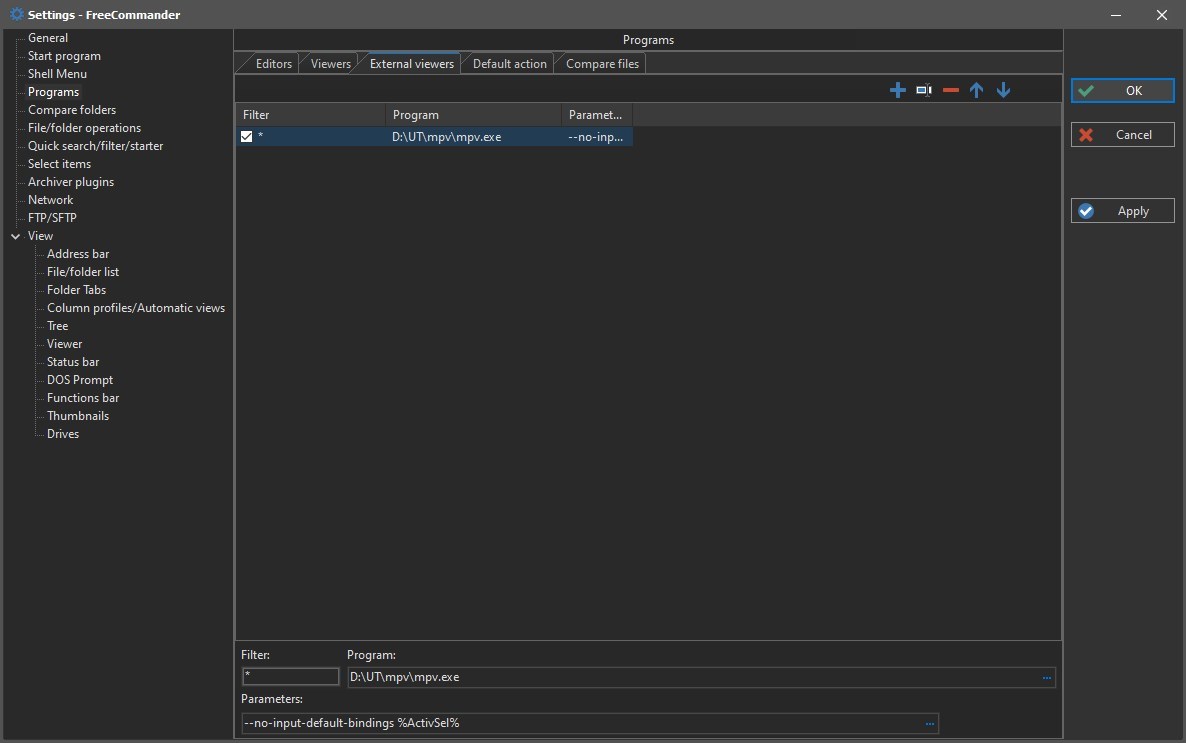
One other note... I have configured "External Viewer" as CTRL ENTER...
And, in 946, when I press CTRL ENTER then the MP4 loads up in MPV.EXE just fine.
What happened to my "ENTER" in 946 ???
And, in 946, when I press CTRL ENTER then the MP4 loads up in MPV.EXE just fine.
What happened to my "ENTER" in 946 ???
- 09.03.2026, 14:18
- Forum: Bug Reports
- Topic: 946 (Portable) - I no longer have "press enter to run"
- Replies: 13
- Views: 11445
Re: 946 (Portable) - I no longer have "press enter to run"
Please re-read the 1st command:
(under v945 portable)
When I press ENTER on a .TXT file, notepad opens the txt file with no issues.
When I press ENTER on a .MP4 file, mpv open the mp4 file with no issues.
(under v946 portable)
When I press ENTER on a .TXT file, notepad opens the txt file with no ...
(under v945 portable)
When I press ENTER on a .TXT file, notepad opens the txt file with no issues.
When I press ENTER on a .MP4 file, mpv open the mp4 file with no issues.
(under v946 portable)
When I press ENTER on a .TXT file, notepad opens the txt file with no ...
- 09.03.2026, 04:16
- Forum: Bug Reports
- Topic: 946 (Portable) - I no longer have "press enter to run"
- Replies: 13
- Views: 11445
Re: 946 (Portable) - I no longer have "press enter to run"
I should also mention that I use "mpv.exe" to run the MP4 files...
- 09.03.2026, 03:57
- Forum: Bug Reports
- Topic: 946 (Portable) - I no longer have "press enter to run"
- Replies: 13
- Views: 11445
Re: 946 (Portable) - I no longer have "press enter to run"
I run FC... I use the arrow keys to cursor down to any MP4 file... I press ENTER... it does not open/run/play...
When I overwrite with 945, I arrow down... press ENTER... and the MP4 plays... (this is Windows 10).
When I overwrite with 945, I arrow down... press ENTER... and the MP4 plays... (this is Windows 10).
- 08.03.2026, 00:01
- Forum: Bug Reports
- Topic: 946 (Portable) - I no longer have "press enter to run"
- Replies: 13
- Views: 11445
946 (Portable) - I no longer have "press enter to run"
Hi, I updated to 946 last night, and found that "pressing enter to run" no longer worked. I downgraded back to 945 and it worked.
- 14.10.2025, 22:13
- Forum: Bug Reports
- Topic: [SOLVED] Rename And List Position
- Replies: 2
- Views: 76685
Re: Rename And List Position
v936, and still having this same "position jump" issue...
- 06.10.2025, 22:42
- Forum: Bug reports
- Topic: [SOLVED] Renaming a file changes display order
- Replies: 0
- Views: 47063
[SOLVED] Renaming a file changes display order
Hi, if I have a folder with say, 100 files, and I rename one of the files near the bottom, it changes the display order... forcing it near the bottom of my window...
I hope you're able to understand/replicate this... it happens if I'm sorting by Name or Modified... the same.
EDIT: Fixed in later ...
I hope you're able to understand/replicate this... it happens if I'm sorting by Name or Modified... the same.
EDIT: Fixed in later ...
- 05.12.2023, 22:34
- Forum: Bug Reports
- Topic: [SOLVED] Rename And List Position
- Replies: 2
- Views: 76685
Re: Rename And List Position
Is anyone else seeing this issue? I have a list of 51 files. I scroll down to file # 47 and rename it from "bob 123.txt" to "bob 1234.txt"... and it "jumps" to the bottom of the list... when it should stay in the same position.
- 13.11.2023, 20:37
- Forum: Bug Reports
- Topic: [SOLVED] Rename And List Position
- Replies: 2
- Views: 76685
[SOLVED] Rename And List Position
I am using the "FreeCommander XE 2023 Build 898 64-bit donor" version.
When you have a list of 150 files, and you're "near the top" of the list and do a rename, it renames, and moves the newly renamed file up or down in the list to correct the "sort by name" in the display.
That works perfectly ...
When you have a list of 150 files, and you're "near the top" of the list and do a rename, it renames, and moves the newly renamed file up or down in the list to correct the "sort by name" in the display.
That works perfectly ...