Search found 16 matches

by freenylon
04.02.2026, 01:17
Forum: Resolved Bugs, Issues, Requests
Topic: FreeCommander XE 2026 Build 944 64-bit non public
Replies: 2
Views: 4240

FreeCommander XE 2026 Build 944 64-bit non public

I believe RENAME is broken in build 944.

After selecting a file and invoking RENAME, the textboxes are empty and unable to be edited...
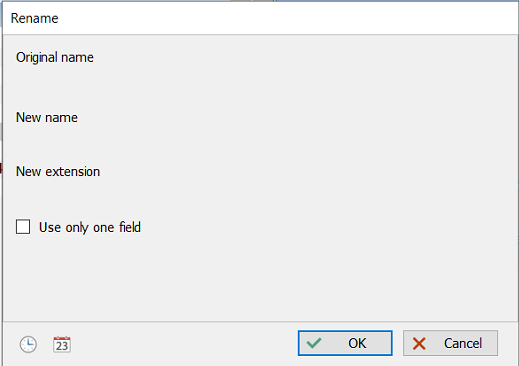
Image

Or maybe it's just my 3 computers...
by freenylon
11.10.2025, 01:55
Forum: Feature Requests
Topic: New folder with selection - keyboard shortcut
Replies: 6
Views: 40147

Re: New folder with selection - keyboard shortcut

Karol wrote: 04.10.2025, 19:15 Could you provide some screenshot with the item "New folder with selection" ?
I think, I do not have such item.
What version of FC are you using?

https://postimg.cc/Mc10ftjn
by freenylon
04.10.2025, 05:15
Forum: Feature Requests
Topic: New folder with selection - keyboard shortcut
Replies: 6
Views: 40147

Re: New folder with selection - keyboard shortcut

Hi Karol. You don't seem to know of the " New folder with selection " feature.

Select a few files, right-click them, and choose " New folder with selection " from the context menu.

You will then see a new folder called " New folder with items " containing the items you selected.

It's neat.
Sweet ...
by freenylon
04.10.2025, 05:07
Forum: Feature Requests
Topic: Rename 'New Folder With Selection'
Replies: 2
Views: 17980

Re: Rename 'New Folder With Selection'

I mean exactly what I said.

When you select some files, right click, and choose " New folder with selection ",

the resulting folder is named " New folder with items "

My point is that I don't like the automatic name. I want the option to immediately rename it to something meaningful.

Try it. See ...
by freenylon
16.09.2025, 03:15
Forum: Feature Requests
Topic: Rename 'New Folder With Selection'
Replies: 2
Views: 17980

Rename 'New Folder With Selection'

I am very fond of the 'New Folder With Selection' feature, and use it regularly.

The downside is that the folder is automatically named 'New Folder With Items', and I *always* need to rename it.

But first, I have to find it. With its name beginning with "N", the new folder often appears in the ...
by freenylon
11.06.2025, 03:55
Forum: Feature Requests
Topic: Multi rename - preserve last "Replace all occurrences" setting
Replies: 2
Views: 44381

Re: Multi rename - preserve last "Replace all occurrences" setting

Thanks. Good thinking.

I had not ever investigated the Multirename Options menu.
Free Commander is always full of new and interesting stuff.
by freenylon
04.06.2025, 03:30
Forum: Feature Requests
Topic: Multi rename bonus - Trim leading/trailing spaces
Replies: 1
Views: 36036

Multi rename bonus - Trim leading/trailing spaces

A handy little addition to multi rename's checkbox options would be "Trim spaces" to remove leading & trailing spaces.

Another bonus would be "Remove double spaces", because they're a pain - and does anyone ever really want a double space in a filename?
by freenylon
04.06.2025, 03:24
Forum: Feature Requests
Topic: Multi rename - preserve last "Replace all occurrences" setting
Replies: 2
Views: 44381

Multi rename - preserve last "Replace all occurrences" setting

In multi-rename, the "Replace all occurrences" defaults to "OFF" every time multirename is invoked.

I usually want that box ticked/checked since that is what I need 99% of the time.

Please either make the default setting ON, or remember its last setting when multi rename is next used.
by freenylon
23.12.2024, 00:09
Forum: Feature Requests
Topic: Multi rename - protecting file extensions
Replies: 3
Views: 48335

Re: Multi rename - protecting file extensions

And, of course, today I discovered UNDO in the Command menu.

D'oh!

:oops:
by freenylon
22.12.2024, 03:12
Forum: Feature Requests
Topic: Multi rename - protecting file extensions
Replies: 3
Views: 48335

Re: Multi rename - protecting file extensions

This is getting serious. I just renamed a few thousand media files to remove the dot (.) within filenames.
I forgot to exclude the filename extension.

I just had to spend an hour manually reinstalling dots before the many different extensions of a few thousand files.

Please make the filename's dot ...
by freenylon
03.11.2024, 00:17
Forum: Bug reports
Topic: Action toolbar - "Details: Auto resize columns" has no icon
Replies: 0
Views: 72271

Action toolbar - "Details: Auto resize columns" has no icon

In my action toolbar, I have "Details: Auto resize columns".

But the icon in the toolbar is blank...

Image

Can I have a nice (non-blank) icon please?
:P
by freenylon
01.11.2024, 01:01
Forum: Feature Requests
Topic: Multi rename - protecting file extensions
Replies: 3
Views: 48335

Multi rename - protecting file extensions

When using multi rename to do a Search/replace, a couple of times the dot before the file extension has been changed, rendering the file meaningless to the OS.

I know there is a tickbox (checkbox) for "Exclude extension", but it is deselected by default, which I believe is a dangerous and unwise ...
by freenylon
15.06.2024, 05:22
Forum: Translation
Topic: English.lng tweaks
Replies: 2
Views: 61133

English.lng tweaks

The English translations of FC strings are usually very accurate and clear, but some could be tweaked.

4602=The file name contains not visible characters typical for malicious software (virus).
Change "not visible" to "invisible"

6012=Destination device is full and happens to be removable
Change ...
by freenylon
19.01.2024, 00:53
Forum: Bug reports
Topic: Define Action Toolbars - removing an item
Replies: 2
Views: 15525

Define Action Toolbars - removing an item

On my Win11 PC, in Define Action Toolbars I have a right-pointing arrow button to remove items from the toolbar.

But on my Win10 PC (with the same version of FC) there is no such arrow button to delete items. I can add items to the toolbar, but can't remove them.

It seems odd.
by freenylon
19.01.2024, 00:46
Forum: Feature Requests
Topic: New folder with selection - keyboard shortcut
Replies: 6
Views: 40147

New folder with selection - keyboard shortcut

I want to map 'New folder with selection' to a shortcut key, but it doesn't appear in the 'Define Keyboard Shortcuts' command list.

Am I missing something?